Sunday, April 11, 2010

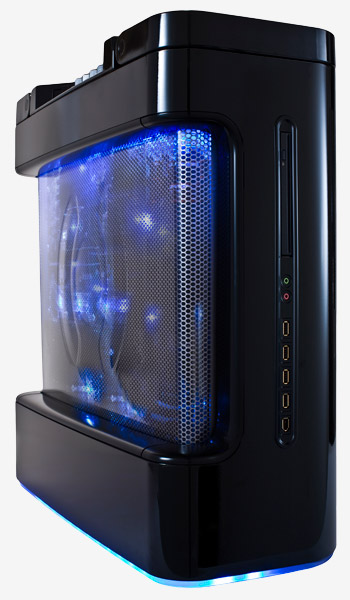
Mouse Computer announces 5 Core i7-980X Extreme Edition Desktops


Mouse Computer Japan introduced this morning 5 Core i7-980X Extreme Edition Desktops with:

2 Business oriented models including the Lm-i900X2 and MDV-ADG9120X sold respectively at 199,500 and 259,980 Yen (1600 – 2100€), including obviously a i7-980X CPU, bust also 12GB of RAM (PC3-10600), 500GB of HDD, a GeFroce GTS250 (1GB of VRAM) a DVD Multi and Windows Home Premium 64Bit for the Lm-i900X2, while the MDV-ADG9120X has 1TB of HDD, a GeForce GTX285 (1GB of VRAM), a Blu-Ray Burner and Windows 7 Professional 64bit.

3 Gamers oriented models including the :
– NEXTGEAR i710GA1-MAMB with a i7-980X Processor Extreme Edition, DDR3 6GB PC3-10600, 2 Intel X25-V 40GB SSD in RAID 0, 1TB SATA II HDD, a DVD Super Multi, a GeForce GTX285 (1GB of VRAM), Windows 7 Home Premium 64bit for 259,980 Yen (2100€)
- MASTERPIECE i1500BA6 with a i7-980X Processor Extreme Edition, DDR3 12GB PC3-10600, 2 Intel X25-M 80GB SSD in RAID 0, 1TB SATA II HDD, a Blu-Ray Drive, 2x GeForce GTX285 (1GB of VRAM) SLI, Windows 7 Home Professional 64Bit for 389,970 Yen (3130€)
- MASTERPIECE i1500BA6-ATI with a i7-980X Processor Extreme Edition, DDR3 12GB PC3-10600, 2 Intel X25-M 80GB SSD in RAID 0, 1TB SATA II HDD, a Blu-Ray Drive, 2x ATI Radeon HD 5850 (1GB of VRAM) CrossFire, Windows 7 Home Professional 64Bit for 379,980 Yen (3050€)

Google Desktop Extreme 2.1

Google Desktop Extreme is one of the thousands of gadgets available for the Google Desktop Search application. But what are the gadgets anyway? The gadgets are plug-in components that enrich your Desktop experience and performs the most incredible and handy tasks that you can imagine and more.
At this point, if you’re not a user already, you might be wondering what is Google Desktop Search. Let me explain that to you and then we come back to the Calendar. This tool is developed by the people from Google, which is quite a reference of its quality, and is a desktop searching engine that allows you to perform searches within your computer as you were searching something on the Internet.
Back to the Desktop Extreme, first thing to say is that you need to have Desktop Search 5 or above running on your system to use this gadget. On the side bar of the Desktop Search you’ll find a round button with an addition sign on it. When you press it, a gadget search window will open and you can browse the huge list to find the one you want. In this case, you just can type in Extreme and Google Desktop Extreme will be listed. Then you press the “Add” button below the gadget thumbnail and that’s it, you’re done! Easy, right? Optionally, you can download the installation file from the Google Gadgets web site and then execute it by double clicking on it. A short installation will take place and the gadget will be ready to go.
Immediately, you will see a new magnifying glass like icon on your tray from where you can perform searches and display the Settings dialog box. From there you can set up some options regarding to the search process, view and behavior of the plug-in. There’s also a quick link to donate if you feel like it.
The basic idea after this gadget is to enhance the searching abilities of the standard Google Desktop Search. When you search with this gadget a window will show the results as you enter your search criteria, in real time. Also, it can classify your results according to categories such as documents, music, video, etc.
All these cool features are accessible for you free of charge, and no matter if you are a Windows, Linux or Macintosh user.

Advantages

* Enhanced search abilities.
* Easy to use.
* Good interface.

Disadvantages

* Adds another icon to the tray.
* Doesn't hide the basic Desktop Search bar.
* Only available in English.

DOWNLOAD GOOGLE DEKSTOP 2.1


Gigabyte X48T-DQ6 Motherboard Features

Gigabyte has chosen the high-end X48/ICH9R chipset to power their X48T-DQ6 motherboard, and it is currently the top X48 combination on the Intel chart. This is a standard ATX motherboard, with measurements of 30.5cm x 24.4cm and it has no board overhang from the standard mounts. The X48T-DQ6 motherboard supports only DDR3 memory, with 4 x 1.5V DDR3 DIMM sockets for up to 8GB of system memory. The X48T-DQ6 offers dual channel DDR3 speeds of 800, 1066, 1333, and 1600 MHz, along with XMP support. The Gigabyte board also provides DDR3 speeds up to 2000 MHz, but this involves higher bus speeds and an overclocked CPU.

The Gigabyte X48T-DQ6 includes dual PCI-E 2.0 x16 graphics with support for ATI CrossFire dual-GPU technology, three PCI Express x1 slots, and two PCI slots. Available storage options include 6 x eSATA 3.0 GB/s ports through the Intel ICH9R, 1 x Parallel ATA IDE and 2 x SATA ports from an onboard Gigabyte SATA chip, and a standard floppy drive connector. The Gigabyte X48T-DQ6 features eight USB 2.0 ports on the back panel, with an additional four ports through onboard headers, for a total of twelve. Also included are three IEEE 1394 ports (two on back panel + one using a bracket), Realtek ALC889A 7.1 audio, and Realtek 8111C Gigabit LAN.


The Gigabyte X48T-DQ6 motherboard backplate/back panel features standard PS/2 mouse/keyboard connectors, eight USB 2.0 ports, two IEEE 1394a ports, two RJ-45 LAN ports, one optical digital line-out, one coaxial S/PDIF line-out, and six audio jacks (Center/Subwoofer Speaker Out / Rear Speaker Out / Side Speaker Out / Line In / Line Out / Microphone). The lack of an eSATA 3Gb/s port is bothersome, but Gigabyte has included two brackets that each feature dual eSATA connectors (for a total of four) and a Molex power connector. We also like when USB ports are set at the top of the back panel for the mouse and keyboard, rather than PS/2.

Hardcore Computer Reactor Extreme PC


$9K Liquid Cooled Gaming Rig Makes Big Splash

The ancient art of overclocking is more delicate ballet than exact science. The goal is to force your hardware to perform at much higher speeds than the manufacturer intended, while compensating for the immense amount of heat generated — heat that can cause system instability, and ultimately deep-fry your PC's innards. Beat the heat and your overclocked PC will frag faster and live longer.

This usually means air-cooling with loud fans, water-cooling, or some combination of the two. Hardcore Computer is trying something a bit different — submerging all of the fancy, expensive PC components in 4.5 gallons of industrial cooling fluid.

This is the DNA that makes up the Reactor PC. Weighing in at just over 100 pounds, this behemoth is clad in 2.5 mm of aircraft aluminum. The tank that contains the fluid is comprised of a plastic similar to a NASA astronaut's visor, plus it's bullet proof, should your gaming lair come under small arms fire.

We received a Reactor test unit packed with variety of high-performance parts, including an Intel Core 2 Extreme processor overclocked to 4 GHz, 4 GB of ram, and three 64-GB solid state drives for wacky-doodle fast (and expensive) data-transfer rates.

Gamers will be interested in the slot loading DVD burner (or optional Blu-ray reader), and the three Nvidia GTX 280s running in SLI. In addition to seeing impressive scores on benchmarking software, we ran the all-important Crysis test, and saw an average of 40 to 45 frames per second with every setting pumped to the absolute maximum. And there's still room to push the pre-overclocked components even further.

For the tinkerers, haxz0rs and IT-minded in the audience, the Reactor is built with high-performance server-grade technology in mind. This includes a pair of 650-W power supplies that provide a total of 1300 watts of juice, plus redundant backup — if one dies, the other will keep on churning. A pair of hot-swappable drives, weighing in at 1 TB each, let you switch your battle plans out for family vacation videos without ever shutting off your PC. Wifi is even built in, complete with two funky antennas that would normally be considered eyesores but somehow look right on the rig.

A substance called Core Coolant is the bloodstream of this gaming monolith. It's a biodegradable, dielectric, non-toxic cooling oil created by Hardcore Computer, and it's is responsible for chilling your key components. Like the typical liquid-cooled setup, a pump circulates the fluid through the Reactor's chassis and into a radiator, where the warmer fluid is made frosty and sent back into the tank.

The key difference between an air- or water-cooled setup and the Reactor is unparalleled heat transfer: You can overclock every piece of your machine without fear of a catastrophic burnout. Fans are positively archaic; air simply can't disperse the amount of heat generated by a gaming rig — it's often in the area of 158 degrees F. Liquid-cooled systems are more efficient, but while the maze of tubes might draw heat from the CPU and graphics cards, plenty of other thermal-generating components are left at risk, typically resulting in system instability.

Submerged cooling isn't perfect. The most obvious issue is the size and weight of the thing, with 4.5 gallons of fluid sloshing around in there. And no matter how careful you are, you'll want to keep a roll of paper towels handy, because there will be a bit of unavoidable splashing when you inevitably pop the lid and start poking around inside the machine. Luckily, Core Coolant (which is clear, odorless, and has the consistency of mineral oil) is safe enough to drink, according to the company. (Please don't drink the Core Coolant.)

But the biggest caveat with the Reactor is that you're buying into an ecosystem. While many of the components can be swapped with off-the-shelf parts, the motherboard and power supplies are packed into custom shells. That means when you want to upgrade the motherboard (maybe to check out that nifty Core i7 CPU from Intel) you'll have to contact Hardcore Computer directly to pick out a new one.

And finally, there's the price.

The configuration we tested came in at a hefty $9,790. But the models start at a reasonable $3,670.

How is that reasonable? A bit of painstaking calculation (method: Google + newegg + napkin) reveals that the DIY price for the components in the starter model comes to roughly $1,000. Essentially you pay about $2,700 for service, a warranty, Core Coolant and a chassis that will support a substantial amount of abuse, overclocking and general tinkering. With the right amount of research, a savvy enthusiast could customize a build to fit their budget and overclock individual components until their performance dwarfs far more expensive machines.

But really, outside of a few supercomputers and aquarium tanks filled with mineral oil, we can almost guarantee you'll be pressed hard to find a PC like this anywhere else.

Hardcore_gallery_thumbs

For more photos of the Reactor PC, inside and out, check out our photo gallery: Soak It To Me: Inside Liquid-Suspended Gaming PC

WIRED Unsurpassed overclocking performance. High quality components at a price that's semi-reasonable. Those LEDs are optional.

TIRED Weighs as much as a '72 Buick and is twice as ugly. Potentially very messy — don't spill Core Coolant on tile floor, it gets slip 'n' slide slick. If Hardcore Computer ever flounders, how will you upgrade those custom parts?

  • Processor: Core 2 Extreme QX9770
  • Power Supply: 2 650W Server Grade PSUs
  • RAM: 4GB of DDR3
  • Graphics Card: 3x Nvidia Geforce GTX 280 in SLI
  • Hard Drives: 2x Samsung 1TB Spinpoint F1, 3x Samsung 64GB SSDs
  • OS: Vista Ultimate